-
ill fuk u up in drag racing mobey, ON MY EPIC 4G GALAXY S II yo nfl pro 2012 is a sick ass gameLeave a comment:
-

Heres a quick update on what I've recently changed to. This is Infinity ROM which is based on CyanogenMod 7.2, Android 2.3.7. It's fully transparent, barebones and odexed. Uses Turbocharger script and SlaidMod script both of which improve performance and battery life. I've gotta say this is hands down the best ROM I've used so far with my Galaxy Ace, even while multi-tasking this beast seems to be flawless and smooth in every aspect.Leave a comment:
-
weird did you try both i posted ?Originally posted by project dragon View Post
on this page there is screenshots to the menu to disable it or tinker with the file manually
rename/delete/replace with blank audiofile the file /system/media/audio/ui/camera_click.oggLeave a comment:
-
I'm not much of a minimalist but I really do like that, Jason. I could mod my CM7.2 with ICS animations and themes which are available right now but I've read that ICS won't actually be available for my little GT-S5830 until way after new year, probably mid 2012 by the looks of it.Leave a comment:
-
i've been rocking the same rom for quite a few months now. this is a custom mix of cm7 and omfgb called blacksourc3, which was developed by droidth3ory before he got a bionic and abandoned thunderbolt dev. it's using a little bit of an outdated cm7 base (which utilizes android 2.3.5 instead of 2.3.7) but it's been so rock solid and smooth as butter for me that i just don't have the heart to flash anything newer.
i don't really care for the look-n-feel of aosp, so i flashed a sense-ish theme. also running widgetlocker, and for my homescreen i've got lpp+ and a mix of fancy and beautiful widgets.
gonna wait for ics roms to come along a little further and then i'll probably finally say goodbye to this beauty.
screens:


Leave a comment:
-
If you use most/all the apps your phone has then its probably better to stay with the stable builds but in my experience with this unofficial 7.2 build, I've come across no bugs what soever as of yet and the speed/responsiveness of this version is greatly improved from 7.0 and some cosmetic improvement too. This is the GT-S5830 port though.Leave a comment:
-
Finally got down to doing it. Had a scare where I was in download-mode and it froze. Thought I bricked the phone, but I just tried to flash it again and it worked. Hurray.
Just CM7 - stable build. Are nightly builds better to have, or just stay with stable and just wait longer?
Anywho, pictures.


I do enjoy having themes. I enjoy pretending I have Ice Cream Sandwich.
Some things though. I can't seem to get calender events to show up on the lockscreen (using their stock calender app), and I can't seem to silence the camera shutter (tried what PD did, but still plays a rather loud sound)Last edited by project dragon; 11-29-2011, 07:05 PM.Leave a comment:
-
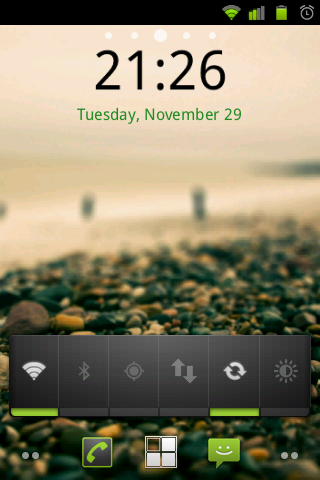
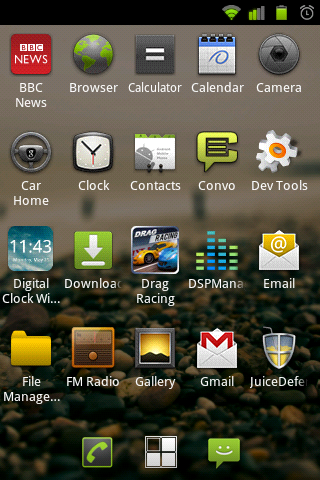
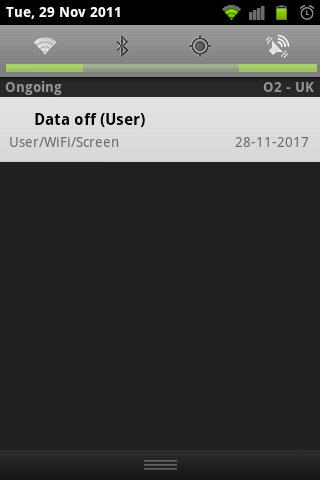
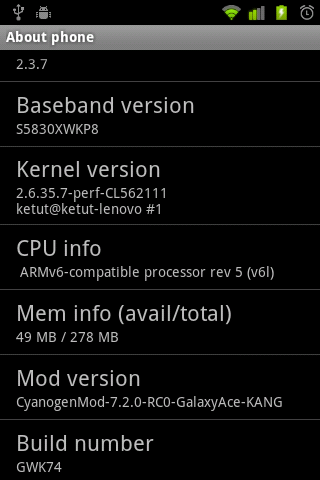
Finally got round to rooting and flashing a custom ROM on my GT-S5830 (Galaxy Ace), it is CyanogenMod 7.2 with Android 2.3.7, no extras.. just the core ROM, speed and usability of the phone has significantly increased, got around 200MB RAM free even when using the browser, battery life also looks to be improved while using Juice Defender. Here's some screenshots;

Leave a comment:
-
apparently so! i dont use my caander much but i updated my gmail one and it synced to my phone (and vice versa) i did install the google addons with cyanogen as it recommends (and cuase i sync my phone with my gmail anyway)Originally posted by project dragon View Post

i like the moving cloud wallpaper even if it's a needless waste of battery :FLeave a comment:
-
bump charging is not advisable. it ultimately won't net you all that much extra power from the battery, but it will definitely decrease the battery's lifespan.
pd is correct about the governor issue. not all mods/kernels will play nice with all phones. what phone do you have btw, money? if battery life dropped that drastically, it's likely one of two things: either it's the governor issue pd mentioned, or you didn't do a proper wipe before flashing cm7. this is what happens when you use something like revolutionary as opposed to flashing manually. doing it manually is more complicated, but it is absolutely worth the time and effort because you can ensure it's being done the right away and you avoid fucking up your phone. (no boot loops or shitty batterly life, for example )
)
you may need to wipe your battery stats, and as project said, you must be sure the phone is at full 100% charge before doing so. an improperly calibrated battery will make the phone think there's less juice left than there truly is, and the phone will shutdown.Leave a comment:
-
The battery calibration I believe deletes whatever battery stats you have on your phone. They should be wrong after you mod it I believe. With the app PD (not me!) linked to, wait till the app says you are at 100%, then press the button.
Another thing that was suggested to me, though I do not know if it is universal for all phones, is to "bump" my battery:
- Charge to 100% while on
- Turn off phone, plug into charger. Wait until the phone says you are fully charged
- Unplug charger, turn phone on, let it fully load up, then turn it off again.
- Plug in charger again, Wait until phone says fully charged.
- Unplug, turn back on, continue with life.
I did that and I am pretty sure it helped. Occasionally I also let the battery completely drain until the phone dies, then I recharge to full.
If anything, CM7 should be GIVING your phone better battery life!
Juice defender is alright, it does what it's supposed to do. I found though with my phone use I could get away with not using it as long as I charge my phone once I go to bed. Usually get to ~45% by the end of the day.
Also! PD, does CM7 have some sort of calendar app that's included that syncs to google calendar? I realized now that the built-in calendar app on my phone does a pretty decent job at syncing my calendars.Leave a comment:
-
what mobey saidOriginally posted by Money View Post
but also there seems to be a bug with this affecting some phones where the defualt ONDEMAND govenor doesn't let the phone sleep so you should change to a static one POWERSAVE or PERFORMANCE
settings > cyanogenmod settings > performance > cpu settings > available govenors
i had the same problem and switched to PERFORMANCE and got better battery life lol charged it last night and was in work today for 8 hours and my phone seems ok for battery life now. Will see how it goes.
The thread i found that told me to switch the settings also said about recalibrating the battery after flashing a rom but i've not done that yet.
https://market.android.com/details?i...erycalibrationLeave a comment:
-
@Money, download the app 'Juice Defender', I installed the free or 'lite' version on my unrooted galaxy ace and improved battery life by atleast 30% imho although not sure if it would have any effect on a rooted android.Leave a comment:


Leave a comment: